WanderingWU · for restaurant groups and multi-kitchen operators 日本語繁體中文한국어
What you sold, what you bought, what it cost. Every kitchen, by the day.
WanderingWU brings your POS sales and supplier invoices together — without replacing your current systems. Catch invoice price changes, check charges against contracted prices, and track theoretical food cost and gross margin on food by kitchen, while there's still time to act.
Powered by A Kitchen Society. Each kitchen's recipes are costed from its own supplier invoices and order-guide prices. WanderingWU ties those recipe costs to POS sales, showing what each dish costs in theory and what it earns at the register.
A working copy with a sample week of sales, invoices and costs. No setup on your side. Best on a laptop or desktop.
- MainsShort rib 27%
- StartersChicken noodle soup 21%
- PizzaMargherita 15%
Gross margin (food) this week $18,420
A look inside
Screens from the demo: a hospital café with a real month of sales and invoices, sample names. A restaurant sees its menu sections where this one shows stations.
The week, while it's still in play
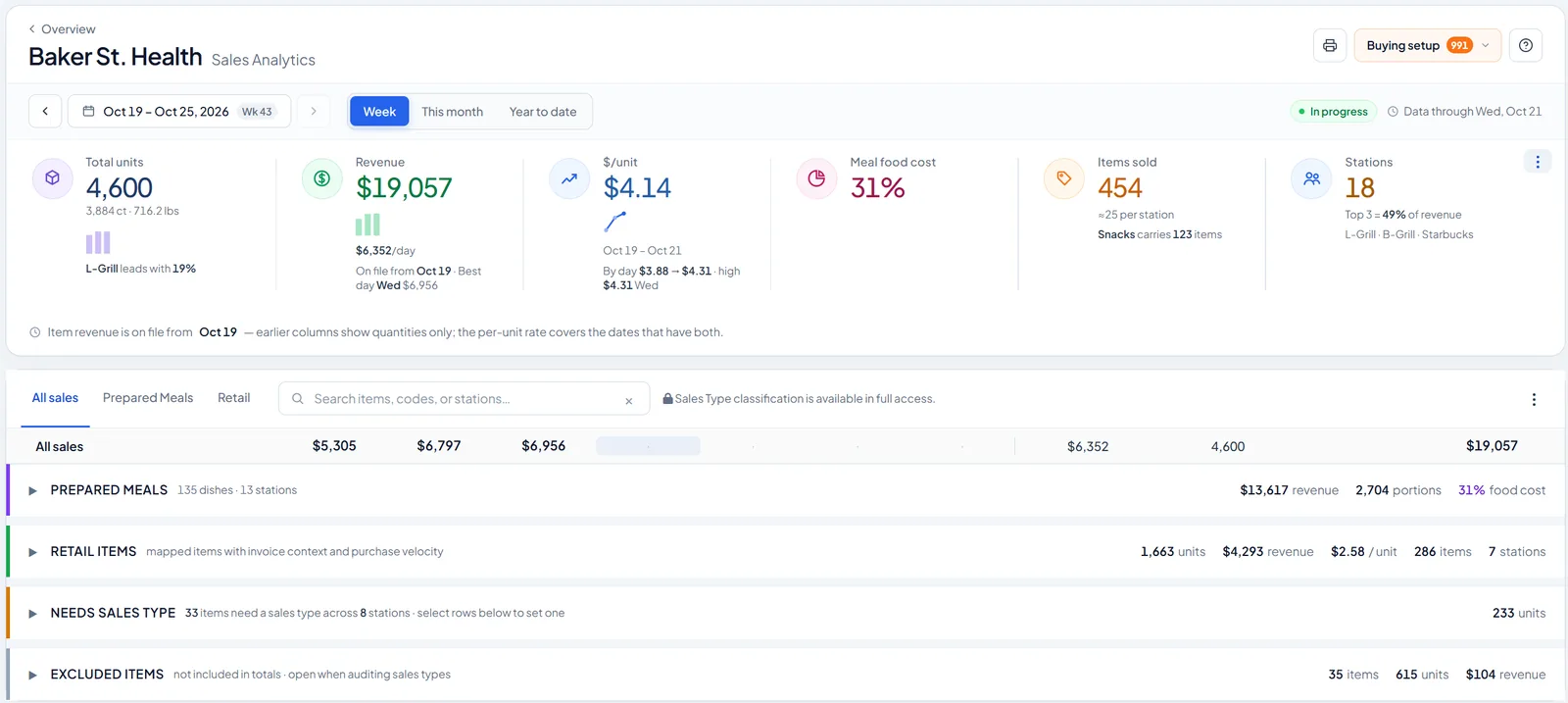
Units, revenue, dollars per sale and theoretical food cost for one location, through yesterday. Prepared meals and retail are kept apart so each has its own numbers.
Down to the station, the section and the dish
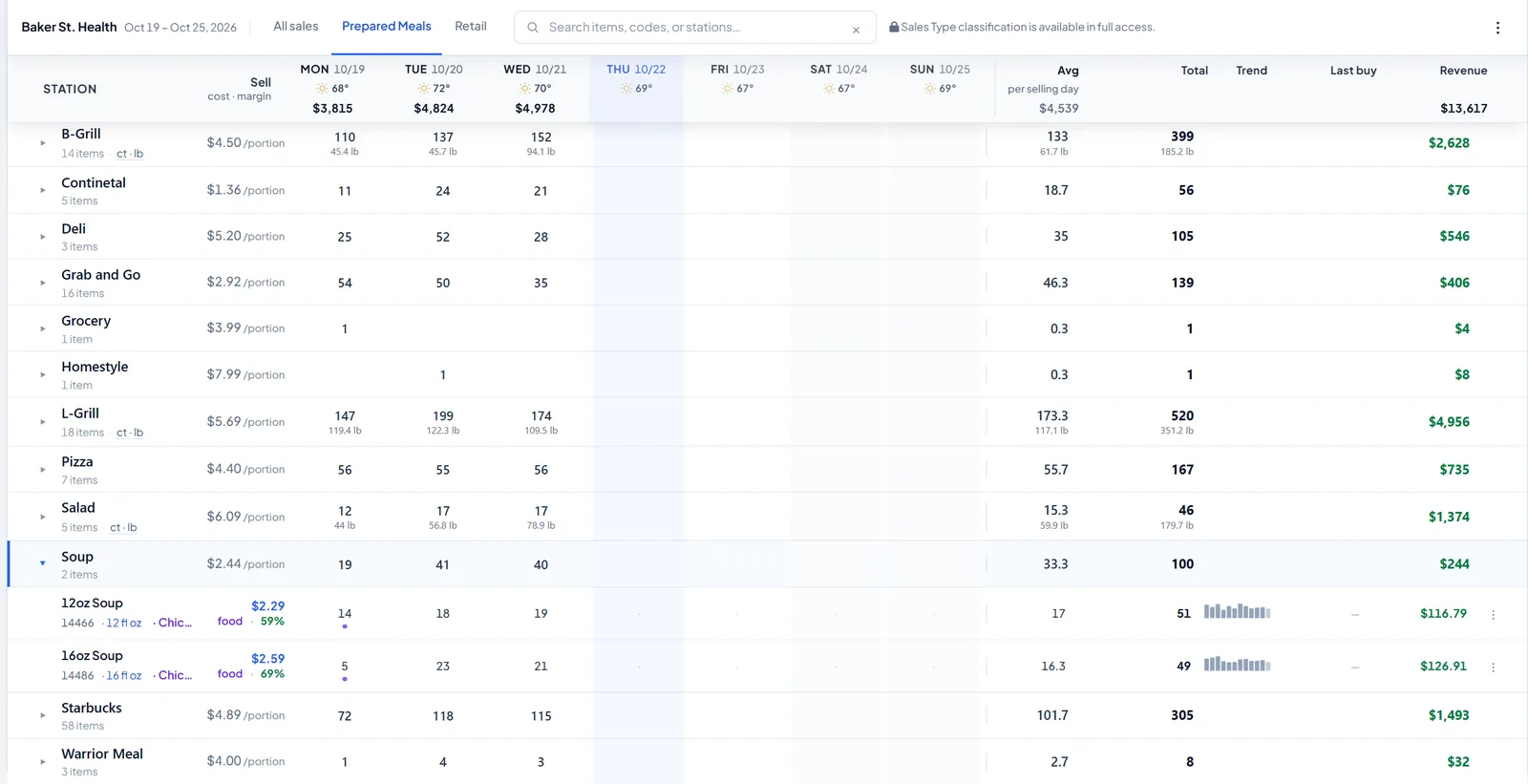
Every station or menu section by day, in portions or pounds, with the price it sells at. Open one and each dish shows its food cost and the margin that's left.
Every case becomes a cost per piece
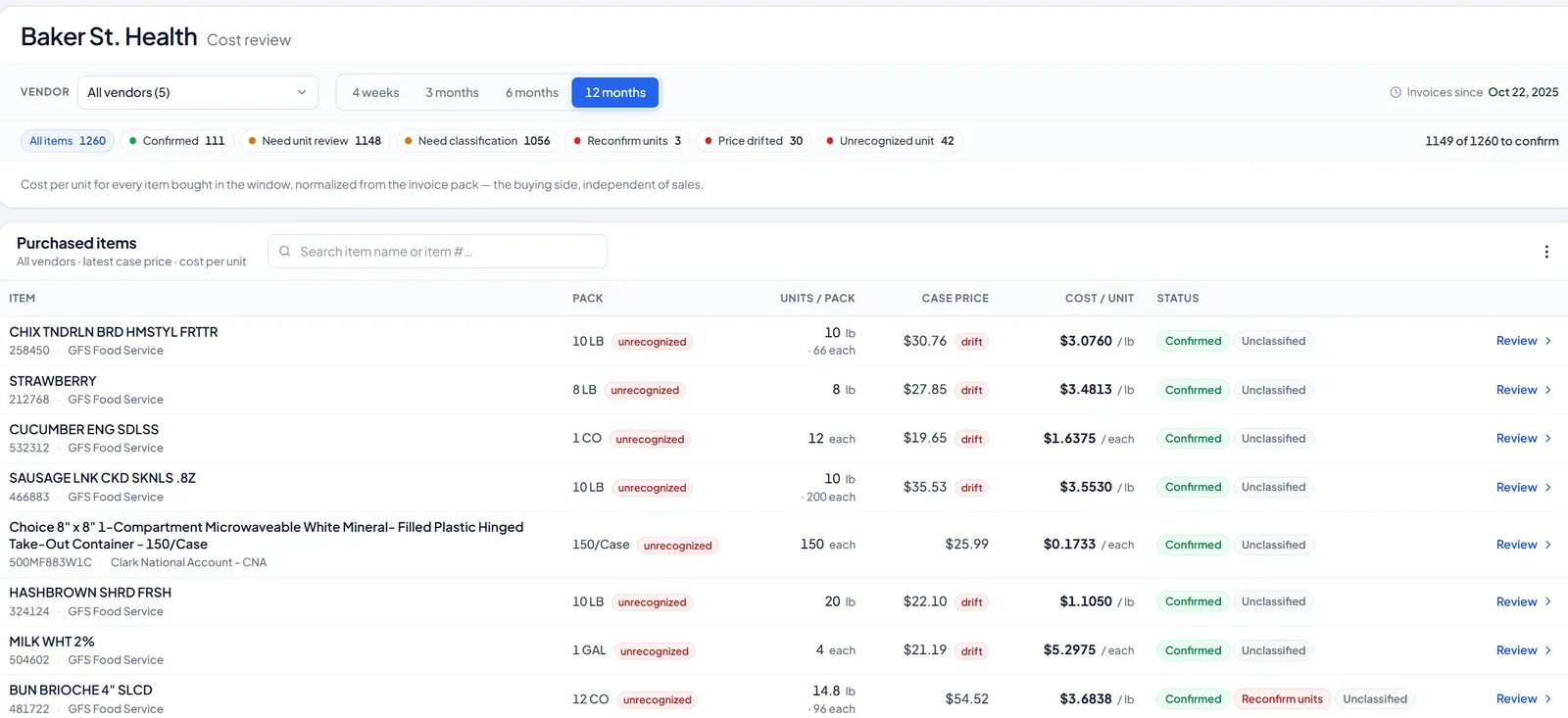
Each product bought from every vendor, its latest case price divided by what the case holds: a cost per pound, per each, per container. A price that moved is flagged.
Invoices, checked against your contract
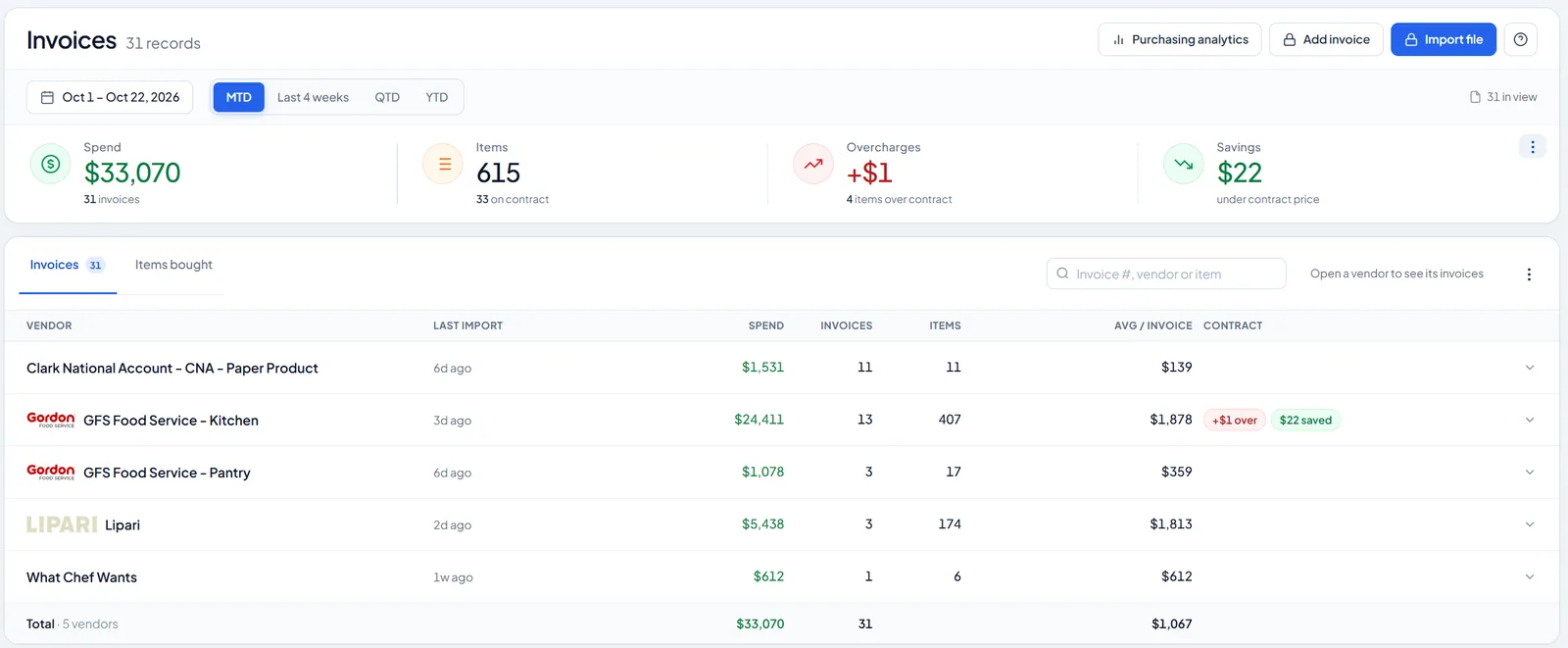
Spend by vendor for the month, and every line compared with the contract price, so overcharges and savings show the day the invoice comes in.
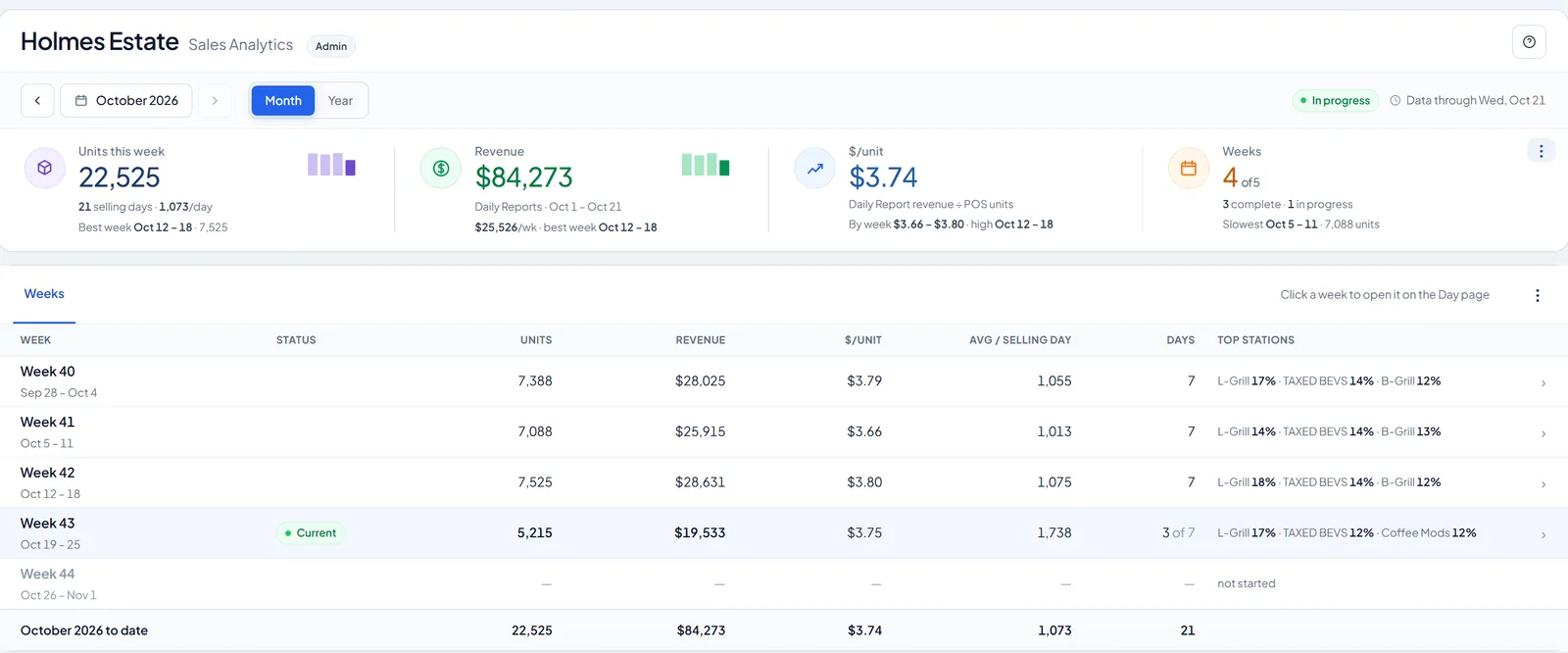
The month, week by week
Weeks side by side across the organization: the best and the slowest, dollars per sale, and the stations that carried each one. Click a week to open its days.
What changes on Monday
Cost while it still matters
Theoretical food cost by location, menu section and day, from this week's sales and this week's invoices, not from the books after the month closes.
Price changes caught on the invoice
Every line is read and checked against what you paid last time and against your contract price. A case that went up, or got smaller, shows the day it arrives.
Every dish, costed from its recipe
Set once what a sale is made of and every day it sells is costed at that day's prices: the plate cost, the theoretical food cost percentage, and the gross margin left at the price it rings at.
Waste you can put a number on
For kitchens that cook to a plan: what was made against what sold, in dollars, section by section, so the pattern is something to manage instead of a feeling.
How it works
- Sales come in The end-of-day item report from each location's POS, by email or upload. Every item is sorted once into a menu section, retail, or not counted.
- Invoices come in PDF, CSV or spreadsheet, read line by line. You confirm once what a case holds (150 containers, a 10 lb bag) and every price after that becomes a cost per piece or per pound. Every correction you make is remembered: the next invoice from that vendor arrives already fixed.
- Dishes get their recipe Each dish on the menu is linked once to what it's made of, with costs and allergens from the recipe. Kitchens that cook to a weekly plan add the plan, the counts and the close-out.
- Everything meets on one page Sold, bought, made and costed for each day of the week, for one location or all of them, with the same numbers wherever you look.
Reads what you already use
No new hardware and no change to how your kitchens order.
Vendor invoices, read automatically
- Gordon Food Service
- Clark National Accounts
- Lipari Foods
- What Chefs Want
- Shamrock Foods
- CaterTrax
POS item reports
- Maitre'D
- Item sales exports (CSV, Excel) from Square, Toast, Clover and others
Another vendor or POS? Most are a template away. Tell us which ones you use.
Who works in it
- Owner, operator, executiveEvery location's results side by side, without waiting for a report.
- Area or regional directorThe locations you cover: who's on cost, who's drifting, and why.
- General managerSales, invoices and the week's numbers for one location.
- ChefEvery dish's cost and gross margin, recipes and specs in one place; plan the week by section where the menu changes daily.
Built for kitchens anywhere
WanderingWU is built per kitchen: its own time zone, its own suppliers, its own prices. Taking it to a new market means teaching it that market's POS reports and supplier invoices, not rebuilding it.
Time
Every account runs on its own local time zone today. Business-day cutoffs for late-night service can be set per account.
Sales
Taxes, discounts, service charges and voids are already read from the POS. Tax-inclusive pricing and refunds are set up per account for markets that need them.
Invoices
Each supplier gets its own template: local units, tax lines, item names and character sets as they print them. Metric and imperial cost through the same chain.
Language
The product is in English today. This page is also in 日本語, 繁體中文 and 한국어; the product follows the first kitchen in each market.
Data protection
Account data is isolated per organization. Regional hosting, retention terms and cross-border processing are agreed per market before the first account goes live. How we hold data →
Operating outside the U.S.? Tell us your POS and your suppliers.
In production today
- Sales analyticsBy location, menu section and dish; theoretical food cost and gross margin by day.
- Invoices and purchasingImport, price checks against your contract, vendor spend. Corrections are learned per vendor and applied on their own once they're consistent.
- Recipes and platesWhat each dish is made of, costed at today's prices; weekly menu plans for kitchens that need them.
- PackagingTo-go pieces per sale, priced from your own invoices.
In the works
- Covers and check averageBy location and by lunch and dinner, from the POS summary.
- Menu engineeringEach dish's popularity against its margin, by menu section.
- Actual vs theoreticalMonth-end counts against what sold, so the gap between the two has a number.
- LaborHours and labor cost beside sales, during the week.
- BudgetsTargets next to actuals, by location.
Running more than one kitchen?
See it on a working copy first. Tell us a little about your locations and we'll send you a demo login, or talk through setting up your own.